在学习编程的时候,每次看到那些整齐规范的代码,心里顿时对这个程序员表示点点好感,有时,比如看到自己和朋友写的代码时,那阅读起来就是苦不堪言,所以,一些基本的开发规范是必须的,是为了自己方便阅读代码,也方便他人阅读修改代码。
命名 驼峰式命名法介绍 文件资源命名 文件名不得含有空格。
文件名建议只使用小写字母,不使用大写字母 ( 为了醒目,某些说明文件的文件名,可以使用大写字母,比如README、LICENSE。 ) 。
文件名包含多个单词时,单词之间建议使用半角的连词线 ( - ) 分隔。
引入资源使用相对路径,不要指定资源所带的具体协议 ( http:,https: ) ,除非这两者协议都不可用。
不推荐:
<script src="http://cdn.com/foundation.min.js"></script>
推荐:
<script src="//cdn.com/foundation.min.js"></script>
变量命名 命名方式 :小驼峰式命名方法
命名规范 :类型+对象描述的方式,如果没有明确的类型,就可以使前缀为名词
类型 小写字母 array a boolean b function fn int i object o regular r string s
推荐 var tableTitle = "LoginTable"
不推荐 var getTitle = "LoginTable"
函数 命名方式 :小驼峰方式 ( 构造函数使用大驼峰命名法 )
命名规则 :前缀为动词
动词 含义 返回值 can 判断是否可执行某个动作 ( 权限 ) 函数返回一个布尔值。true:可执行;false:不可执行 has 判断是否含有某个值 函数返回一个布尔值。true:含有此值;false:不含有此值 is 判断是否为某个值 函数返回一个布尔值。true:为某个值;false:不为某个值 get 获取某个值 函数返回一个非布尔值 set 设置某个值 无返回值、返回是否设置成功或者返回链式对象
推荐:
//是否可阅读
function canRead(){
    return true;
}


//获取姓名
function getName{
    return this.name
}
常量 命名方法 :全部大写
命名规范 :使用大写字母和下划线来组合命名,下划线用以分割单词
推荐:
var MAX_COUNT = 10;
var URL = 'http://www.baidu.com';
类的成员 推荐(将name换成this是不是更熟悉了呢)
function Student(name) {
    var _name = name; // 私有成员


    // 公共方法
    this.getName = function () {
        return _name;
    }


    // 公共方式
    this.setName = function (value) {
        _name = value;
    }
}
var st = new Student('tom');
st.setName('jerry');
console.log(st.getName()); // => jerry:输出_name私有变量的值
注释规范 单行注释(//) 推荐:
// 调用了一个函数;1)单独在一行
setTitle();


var maxCount = 10; // 设置最大量;2)在代码后面注释


// setName(); // 3)注释代码
多行注释( / 注释说明 /) 推荐:
/*
* 代码执行到这里后会调用setTitle()函数
* setTitle():设置title的值
*/
setTitle();
函数(方法)注释 函数(方法)注释也是多行注释的一种,但是包含了特殊的注释要求,参照 javadoc(百度百科)
语法:
常用注释关键字
注释名 语法 含义 示例 @param @param 参数名 {参数类型} 描述信息 描述参数的信息 @param name {String} 传入名称 @return @return {返回类型} 描述信息 描述返回值的信息 @return {Boolean} true:可执行;false:不可执行 @author @author 作者信息 [附属信息:如邮箱、日期] 描述此函数作者的信息 @author 张三 2015/07/21 @version @version XX.XX.XX 描述此函数的版本号 @version 1.0.3 @example @example 示例代码 @example setTitle('测试') 如下
推荐:
/**
 - 合并Grid的行
 - @param grid {Ext.Grid.Panel} 需要合并的Grid
 - @param cols {Array} 需要合并列的Index(序号)数组;从0开始计数,序号也包含。
 - @param isAllSome {Boolean} :是否2个tr的cols必须完成一样才能进行合并。true:完成一样;false(默认):不完全一样
 - @return void
 - @author polk6 2015/07/21
 - @example
 - _________________                             _________________
 - |  年龄 |  姓名 |                             |  年龄 |  姓名 |
 - -----------------      mergeCells(grid,[0])   -----------------
 - |  18   |  张三 |              =>             |       |  张三 |
 - -----------------                             -  18   ---------
 - |  18   |  王五 |                             |       |  王五 |
 - -----------------                             -----------------
*/
function mergeCells(grid, cols, isAllSome) {
    // Do Something
}
HTML规范 文档规范 HTML5的文档类型声明: <!DOCTYPE html>
DOCTYPE标签是一种标准通用标记语言的文档类型声明,它的目的是要告诉标准通用标记语言解析器,它应该使用什么样的文档类型定义(DTD)来解析文档。
使用文档声明类型的作用是为了防止开启浏览器的怪异模式。
没有DOCTYPE文档类型声明会开启浏览器的怪异模式,浏览器会按照自己的解析方式渲染页面,在不同的浏览器下面会有不同的样式。
如果你的页面添加了<!DOCTYP>那么,那么就等同于开启了标准模式。浏览器会按照W3C标准解析渲染页面。
脚本加载 说到js和css的位置,大家应该都知道js放在下面,css放在上面。但是,如果你的项目只需要兼容ie10+或者只是在移动端访问,那么可以使用HTML5的新属性async,将脚本文件放在< head >内
兼容老旧浏览器(IE9-)时:
脚本引用写在 body 结束标签之前,并带上 async 属性。这虽然在老旧浏览器中不会异步加载脚本,但它只阻塞了 body 结束标签之前的 DOM 解析,这就大大降低了其阻塞影响。
而在现代浏览器中:
脚本将在 DOM 解析器发现 body 尾部的 script标签才进行加载,此时加载属于异步加载,不会阻塞 CSSOM(但其执行仍发生在 CSSOM 之后)。
综上所述,所有浏览器中推荐:
<html>
  <head>
    <link rel="stylesheet" href="main.css">
  </head>
  <body>
    <!-- body goes here -->


    <script src="main.js" async></script>
  </body>
</html>
只兼容现代浏览器推荐:
<html>
  <head>
    <link rel="stylesheet" href="main.css">
    <script src="main.js" async></script>
  </head>
  <body>
    <!-- body goes here -->
  </body>
</html>
语义化 我们一直都在说语义化编程,语义化编程,但是在代码中很少有人完全使用正确的元素。使用语义化标签也是有理由SEO的。
不推荐:
<b>My page title</b>
<div class="top-navigation">
  <div class="nav-item"><a href="#home">Home</a></div>
  <div class="nav-item"><a href="#news">News</a></div>
  <div class="nav-item"><a href="#about">About</a></div>
</div>


<div class="news-page">
  <div class="page-section news">
    <div class="title">All news articles</div>
    <div class="news-article">
      <h2>Bad article</h2>
      <div class="intro">Introduction sub-title</div>
      <div class="content">This is a very bad example for HTML semantics</div>
      <div class="article-side-notes">I think I'm more on the side and should not receive the main credits</div>
      <div class="article-foot-notes">
        This article was created by David <div class="time">2014-01-01 00:00</div>
      </div>
    </div>


    <div class="section-footer">
      Related sections: Events, Public holidays
    </div>
  </div>
</div>


<div class="page-footer">
  Copyright 2014
</div>
推荐:
html 代码:
<!-- The page header should go into a header element -->
<header>
  <!-- As this title belongs to the page structure it's a heading and h1 should be used -->
  <h1>My page title</h1>
</header>


<!-- All navigation should go into a nav element -->
<nav class="top-navigation">
  <!-- A listing of elements should always go to UL (OL for ordered listings) -->
  <ul>
    <li class="nav-item"><a href="#home">Home</a></li>
    <li class="nav-item"><a href="#news">News</a></li>
    <li class="nav-item"><a href="#about">About</a></li>
  </ul>
</nav>


<!-- The main part of the page should go into a main element (also use role="main" for accessibility) -->
<main class="news-page" role="main">
  <!-- A section of a page should go into a section element. Divide a page into sections with semantic elements. -->
  <section class="page-section news">
    <!-- A section header should go into a section element -->
    <header>
      <!-- As a page section belongs to the page structure heading elements should be used (in this case h2) -->
      <h2 class="title">All news articles</h2>
    </header>


    <!-- If a section / module can be seen as an article (news article, blog entry, products teaser, any other
     re-usable module / section that can occur multiple times on a page) a article element should be used -->
    <article class="news-article">
      <!-- An article can contain a header that contains the summary / introduction information of the article -->
      <header>
        <!-- As a article title does not belong to the overall page structure there should not be any heading tag! -->
        <div class="article-title">Good article</div>
        <!-- Small can optionally be used to reduce importance -->
        <small class="intro">Introduction sub-title</small>
      </header>


      <!-- For the main content in a section or article there is no semantic element -->
      <div class="content">
        <p>This is a good example for HTML semantics</p>
      </div>
      <!-- For content that is represented as side note or less important information in a given context use aside -->
      <aside class="article-side-notes">
        <p>I think I'm more on the side and should not receive the main credits</p>
      </aside>
      <!-- Articles can also contain footers. If you have footnotes for an article place them into a footer element -->
      <footer class="article-foot-notes">
        <!-- The time element can be used to annotate a timestamp. Use the datetime attribute to specify ISO time
         while the actual text in the time element can also be more human readable / relative -->
        <p>This article was created by David <time datetime="2014-01-01 00:00" class="time">1 month ago</time></p>
      </footer>
    </article>


    <!-- In a section, footnotes or similar information can also go into a footer element -->
    <footer class="section-footer">
      <p>Related sections: Events, Public holidays</p>
    </footer>
  </section>
</main>


<!-- Your page footer should go into a global footer element -->
<footer class="page-footer">
  Copyright 2014
</footer>
alt标签不为空 <img>标签的 alt 属性指定了替代文本,用于在图像无法显示或者用户禁用图像显示时,代替图像显示在浏览器中的内容。
假设由于下列原因用户无法查看图像,alt 属性可以为图像提供替代的信息:
网速太慢
src属性中的错误
浏览器禁用图像
用户使用的是屏幕阅读器
从SEO角度考虑,浏览器的爬虫爬不到图片的内容,所以我们要有文字告诉爬虫图片的内容。
结构、表现、行为三者分离 尽量在文档和模板中只包含结构性的 HTML;而将所有表现代码,移入样式表中;将所有动作行为,移入脚本之中。
在此之外,为使得它们之间的联系尽可能的小,在文档和模板中也尽量少地引入样式和脚本文件。
建议:
不使用超过一到两张样式表
不使用超过一到两个脚本(学会用合并脚本)
不使用行内样式(< style>.no-good {}< /style>)
不在元素上使用 style 属性(< hr style="border-top: 5px solid black">)
不使用行内脚本(< script>alert('no good')< /script>)
不使用表象元素(i.e. < b>, < u>, < center>, < font>, < b>)
不使用表象 class 名(i.e. red, left, center)
HTML只关注内容
不推荐:
<!-- We should not introduce an additional element just to solve a design problem  -->
<span class="text-box">
  <span class="square"></span>
  See the square next to me?
</span>
css 代码:
.text-box > .square {
  display: inline-block;
  width: 1rem;
  height: 1rem;
  background-color: red;
}
推荐:
html 代码:
<!-- That's clean markup! -->
<span class="text-box">
  See the square next to me?
</span>
css 代码:
/* We use a :before pseudo element to solve the design problem of placing a colored square in front of the text content */
.text-box:before {
  content: "";
  display: inline-block;
  width: 1rem;
  height: 1rem;
  background-color: red;
}
图片和 SVG 图形能被引入到 HTML 中的唯一理由是它们呈现出了与内容相关的一些信息。
不推荐
html 代码:
<!-- Content images should never be used for design elements!  -->
<span class="text-box">
  <img src="square.svg" alt="Square" />
  See the square next to me?
</span>
推荐:
html 代码:
<!-- That's clean markup! -->
<span class="text-box">
  See the square next to me?
</span>
css 代码:
/* We use a :before pseudo element with a background image to solve the problem */
.text-box:before {
  content: "";
  display: inline-block;
  width: 1rem;
  height: 1rem;
  background: url(square.svg) no-repeat;
  background-size: 100%;
}
js规范 避免全局命名空间污染 防止全局命名空间被污染,我们通常的做法是将代码包裹成一个 IIFE(Immediately-Invoked Function Expression),创建独立隔绝的定义域。也使得内存在执行完后立即释放。
IIFE 还可确保你的代码不会轻易被其它全局命名空间里的代码所修改(i.e. 第三方库,window引用,被覆盖的未定义的关键字等等)。
不推荐:
var x = 10,
    y = 100;


// Declaring variables in the global scope is resulting in global scope pollution. All variables declared like this
// will be stored in the window object. This is very unclean and needs to be avoided.
console.log(window.x + ' ' + window.y);
推荐:
// We declare a IIFE and pass parameters into the function that we will use from the global space
(function(log, w, undefined){
  'use strict';


  var x = 10,
      y = 100;


  // Will output 'true true'
  log((w.x === undefined) + ' ' + (w.y === undefined));


}(window.console.log, window));
推荐的IIFE写法:
(function(){
  'use strict';


  // Code goes here


}());
如果你想引用全局变量或者是外层 IIFE 的变量,可以通过下列方式传参:
(function($, w, d){
  'use strict';


  $(function() {
    w.alert(d.querySelectorAll('div').length);
  });
}(jQuery, window, document));
严格模式 ECMAScript 5 严格模式可在整个脚本或独个方法内被激活。它对应不同的 javascript语境会做更加严格的错误检查。严格模式也确保了 javascript代码更加的健壮,运行的也更加快速。
严格模式会阻止使用在未来很可能被引入的预留关键字。
你应该在你的脚本中启用严格模式,最好是在独立的 IIFE 中应用它。避免在你的脚本第一行使用它而导致你的所有脚本都启动了严格模式,这有可能会引发一些第三方类库的问题。
变量声明 总是使用 var 来声明变量,并且使用单var模式(将所有的变量在函数最前面只使用一个var定义)。例如:
var a = b =0;//b会被隐式的创建为全局变量
所以,请总是使用 var 来声明变量,并且使用单var模式(将所有的变量在函数最前面只使用一个var定义)。
例如:
(function (){
  'use strict'
  var a = 0,
      b = 0,
      c = 0,
      i,
      j,
      myObject();
}())
采用严格模式带来的好处是,当你手误输入错误的变量名时,它可以通过报错信息来帮助你定位错误出处。
js声明提前 javascript会自动将函数作用域内的变量和方法的定义提前(只是提前声明,赋值还是在原处)
例如:
(function(log){
  'use strict';


  var a = 10;


  for(var i = 0; i < a; i++) {
    var b = i * i;
    log(b);
  }


  if(a === 10) {
    var f = function() {
      log(a);
    };
    f();
  }


  function x() {
    log('Mr. X!');
  }
  x();


}(window.console.log));
提升后的js
(function(log){
  'use strict';
  // All variables used in the closure will be hoisted to the top of the function
  var a,
      i,
      b,
      f;
  // All functions in the closure will be hoisted to the top
  function x() {
    log('Mr. X!');
  }


  a = 10;


  for(i = 0; i < a; i++) {
    b = i * i;
    log(b);
  }


  if(a === 10) {
    // Function assignments will only result in hoisted variables but the function body will not be hoisted
    // Only by using a real function declaration the whole function will be hoisted with its body
    f = function() {
      log(a);
    };
    f();
  }


  x();


}(window.console.log));
使用严格等 总是使用 === 精确的比较操作符,避免在判断的过程中,由 JavaScript的强制类型转换所造成的困扰。
例如:
(function(log){
  'use strict';


  log('0' == 0); // true
  log('' == false); // true
  log('1' == true); // true
  log(null == undefined); // true


  var x = {
    valueOf: function() {
      return 'X';
    }
  };


  log(x == 'X');


}(window.console.log));
等同== 和严格等===的区别 ==等同操作符
如果两个值具有相同类型,会进行 === 比较,返回 === 的比较值
如果两个值不具有相同类型,也有可能返回true
如果一个值是null另一个值是undefined,返回true
如果一个值是string另个是number,会把string转换成number再进行比较
如果一个值是true,会把它转成1再比较,false会转成0
console.log( false == null )      // false
console.log( false == undefined ) // false
console.log( false == 0 )         // true
console.log( false == '' )        // true
console.log( false == NaN )       // false


console.log( null == undefined ) // true
console.log( null == 0 )         // false
console.log( null == '' )        // false
console.log( null == NaN )       // false


console.log( undefined == 0)   // false
console.log( undefined == '')  // false
console.log( undefined == NaN) // false


console.log( 0 == '' )  // true
console.log( 0 == NaN ) // false
总结一下== false 除了和自身比较为 true 外,和 0,"" 比较也为 true
null 只和 undefined 比较时为 true, 反过来 undefined 也仅和 null 比较为 true,没有第二个
0 除了和 false 比较为 true,还有空字符串 ”” 和空数组 []
空字符串 "" 除了和 false 比较为 true,还有一个数字 0
==, >, <, +, -, … 这些操作符所造成的隐式类型转换都是无副作用的,它不会改变变量本身保存的值。但是,如果你覆写某个对象 的 valueOf/toString的话,==就会产生副作用.
例如:
Array.prototype.valueOf = function() {
  this[0]++;
  return this;
}
var x = [1, 2, 3];
x == 0;
console.log(x);   // [2, 2, 3]
===操作符:
要是两个值类型不同,返回false
要是两个值都是number类型,并且数值相同,返回true
要是两个值都是stirng,并且两个值的String内容相同,返回true
要是两个值都是true或者都是false,返回true
要是两个值都是指向相同的Object,Arraya或者function,返回true
要是两个值都是null或者都是undefined,返回true
真假判断 js中以下内容为假:
false
null
undefined
0
’‘(空字符串)
NaN
设置默认参数 逻辑操作符 || 和 && 也可被用来返回布尔值。如果操作对象为非布尔对象,那每个表达式将会被自左向右地做真假判断。基于此操作,最终总有一个表达式被返回回来。这在变量赋值时,是可以用来简化你的代码的。例如:如果x不存在且y不存在,x=1;如果x存在y存在,x = y
if(!x) {
  if(!y) {
    x = 1;
  } else {
    x = y;
  }
}
等同于:
x = x || y ||1;
这一小技巧经常用来给方法设定默认的参数。
(function(log){
  'use strict';


  function multiply(a, b) {
    a = a || 1;
    b = b || 1;


    log('Result ' + a * b);
  }


  multiply(); // Result 1
  multiply(10); // Result 10
  multiply(3, NaN); // Result 3
  multiply(9, 5); // Result 45


}(window.console.log));
不适用eval()函数 如eval的字面意思来说,恶魔,使用eval()函数会带来安全隐患。
eval()函数的作用是返回任意字符串,当作js代码来处理。
this关键字 只在对象构造器、方法和在设定的闭包中使用 this 关键字。this 的语义在此有些误导。它时而指向全局对象(大多数时),时而指向调用者的定义域(在 eval 中),时而指向 DOM 树中的某一节点(当用事件处理绑定到 HTML 属性上时),时而指向一个新创建的对象(在构造器中),还时而指向其它的一些对象(如果函数被 call() 和 apply() 执行和调用时)。
正因为它是如此容易地被搞错,请限制它的使用场景:
在构造函数中
在对象的方法中(包括由此创建出的闭包内)
首选函数式风格 函数式编程让你可以简化代码并缩减维护成本,因为它容易复用,又适当地解耦和更少的依赖。
接下来的例子中,在一组数字求和的同一问题上,比较了两种解决方案。第一个例子是经典的程序处理,而第二个例子则是采用了函数式编程和 ECMA Script 5.1 的数组方法。
不推荐:
(function(log){
  'use strict';


  var arr = [10, 3, 7, 9, 100, 20],
      sum = 0,
      i;


  for(i = 0; i < arr.length; i++) {
    sum += arr[i];
  }


  log('The sum of array ' + arr + ' is: ' + sum)


}(window.console.log));
推荐(函数式编程):
(function(log){
  'use strict';


  var arr = [10, 3, 7, 9, 100, 20];


  var sum = arr.reduce(function(prevValue, currentValue) {
    return prevValue + currentValue;
  }, 0);


  log('The sum of array ' + arr + ' is: ' + sum);


}(window.console.log));
修改内建对象原型链 修改内建的诸如 Object.prototype 和 Array.prototype 是被严厉禁止的。
修改其它的内建对象比如 Function.prototype,虽危害没那么大,但始终还是会导致在开发过程中难以 debug 的问题,应当也要避免。
三元条件判断(if 的快捷方法) 用三元操作符分配或返回语句。在比较简单的情况下使用,避免在复杂的情况下使用。没人愿意用 10 行三元操作符把自己的脑子绕晕。
不推荐:
if(x === 10) {
  return 'valid';
} else {
  return 'invalid';
}
推荐:
return x ===10?'valid':'invalid'
JSHint 在js规范中,有很多规范都是样式上的规范而不是逻辑上的规范,比如尽量使用=== 而不是==,我们可以使用JSHint或者JSLint,Javascript代码验证工具,这种工具可以检查你的代码并提供相关的代码改进意见。我个人使用的是JSHint,所以就以这个为例.
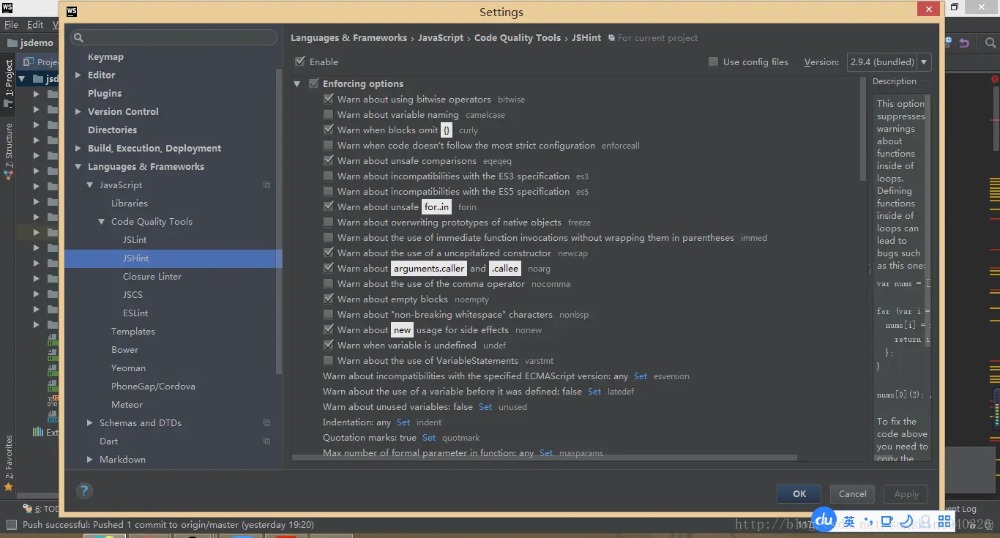
webstorm内置JSHint 对于ws爱好者来说,我没有用过其他的编译器,ws基本上能满足你的所有需求(最新的ws集成了vue)。
在Settings => language & frameworks => JavaScript=> Code Quality Tolls => JSHint
webstorm中的jshint 这些规范都是什么意思呢,这里列出一些常用的,其余规范参考官方文档:http://jshint.com/docs/
名称 含义 curly 循环或者条件语句必须使用花括号包住 eqeqeq 使用强制等=== newcap 对于首字母大写的函数(声明的类),强制使用new noarg 禁用arguments.caller和arguments.callee sub 对于属性使用aaa.bbb而不是aaa['bbb'] undef 查找所有未定义的变量 boss 查找类似与if(a = 0)这样的代码 node 指定运行环境为node strict 必须使用严格模式 asi 允许省略分号 bitwise 禁止使用位运算符,比如经常把&&写错& 规避此错误 jquery 定义全局暴露的jQuery库 evil 禁止使用eval maxdepth 嵌套的最大深度 maxparams 参数的最大个数
CSS规范 id和class的命名 ID和class的名称总是使用可以反应元素目的和用途的名称,或其他通用的名称,代替表象和晦涩难懂的名称。
不推荐:
.fw-800 {
  font-weight: 800;
}


.red {
  color: red;
}
推荐:
.heavy {
  font-weight: 800;
}


.important {
  color: red;
}
合理的使用ID 一般情况下ID不应该被用于样式,并且ID的权重很高,所以不使用ID解决样式的问题,而是使用class
不推荐:
#content .title {
  font-size: 2em;
}
推荐:
.content .title {
  font-size: 2em;
}
css选择器中避免使用标签名 从结构、表现、行为分离的原则来看,应该尽量避免css中出现HTML标签,并且在css选择器中出现标签名会存在潜在的问题
使用子选择器 很多前端开发人员写选择器链的时候不使用 直接子选择器(注:直接子选择器和后代选择器的区别)。
有时,这可能会导致疼痛的设计问题并且有时候可能会很耗性能。
然而,在任何情况下,这是一个非常不好的做法。
如果你不写很通用的,需要匹配到DOM末端的选择器, 你应该总是考虑直接子选择器。
不推荐:
.content .title {
  font-size: 2rem;
}
推荐:
.content > .title {
  font-size: 2rem;
}
尽量使用缩写属性 尽量使用缩写属性对于代码效率和可读性是很有用的,比如font属性。
不推荐:
border-top-style: none;
font-family: palatino, georgia, serif;
font-size: 100%;
line-height: 1.6;
padding-bottom: 2em;
padding-left: 1em;
padding-right: 1em;
padding-top: 0;
推荐:
border-top: 0;
font: 100%/1.6 palatino, georgia, serif;
padding: 0 1em 2em;
0后面不带单位 省略0后面的单位
不推荐:
padding-bottom: 0px;
margin: 0em;
推荐:
padding-bottom: 0;
margin: 0;
属性格式 为了保证一致性和可扩展性,每个声明应该用分号结束,每个声明换行。
属性名的冒号后使用一个空格。出于一致性的原因,属性和值(但属性和冒号之间没有空格)的之间始终使用一个空格。
每个选择器和属性声明总是使用新的一行。
属性选择器或属性值用双引号(””),而不是单引号(”)括起来。
URL值(url())不要使用引号。
作为实践,遵循以下顺序:
结构型属性:
display
position,left,top,right,etc
overflow,float,clear,etc
margin,padding
表现型属性:
background,border,etc
font,text
不推荐:
.box {
  font-family: 'Arial', sans-serif;
  border: 3px solid #ddd;
  left: 30%;
  position: absolute;
  text-transform: uppercase;
  background-color: #eee;
  right: 30%;
  isplay: block;
  font-size: 1.5rem;
  overflow: hidden;
  padding: 1em;
  margin: 1em;
}
推荐:
.box {
  display: block;
  position: absolute;
  left: 30%;
  right: 30%;
  overflow: hidden;
  margin: 1em;
  padding: 1em;
  background-color: #eee;
  border: 3px solid #ddd;
  font-family: 'Arial', sans-serif;
  font-size: 1.5rem;
  text-transform: uppercase;
}
相关文章:
原文地址:
https://juejin.im/post/592d4a5b0ce463006b43b6da




 400 186 1886